How to check if a device is enrolled to the Windows Remote Device Management (Intune) Service
Requirements
A Windows computer enrolled in Intune
Instructions
- Open the Settings application - Either by going to the Start menu and click the Settings button:

Or by typing "Settings" into the search and open the Settings application: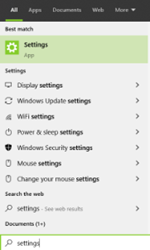
- Click on "Accounts":

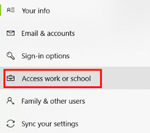
- Click on "Access work or school":
- If it is connected you should see "Connected to Clinical School Computing Service's Azure AD":
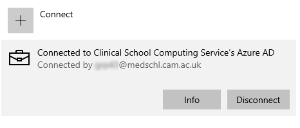
If you see an entry like below then it is not connected to the Windows Remote Device Management System (Intune)
